
According to Capterra's 2024 report, 58% of businesses regret at least one software purchase. Pick the wrong tools, and you'll get stuck with systems that can't integrate, can't scale, and slow you down.
Most businesses make this mistake. Let's make sure you don't.
Whether you're selecting the right ERP system, building a software implementation plan, or learning how to choose business software, this proven 5-step technology selection process will guide you to the right decision.
Step 1: Identify the Business Problem
Before choosing any technology, be clear about what problem it's meant to solve.
Not "we want to use AI" or "we need automation," but where the business is losing time, creating errors, or relying on manual work.
If you can't explain the problem in one clear sentence, you're not ready to choose a tool yet.
Technology should remove friction, not add complexity.
Example: Instead of "we need better project management," identify: "Our team loses 8 hours per week tracking project updates across email, Slack, and spreadsheets."
Once the problem is clear, move to step two.
Step 2: Define Your Requirements and Criteria
Once the problem is clear, define what the solution must do. Not every feature matters—only what directly supports the business.
Focus on Three Things
1. What the tool needs to handle List core capabilities required to solve your identified problem. These are non-negotiables.
2. How simple it must be for your team A powerful tool that your team doesn't adopt is a wasted investment. Match the complexity to your team's technical skill level.
3. What systems it needs to connect with Integration is critical. A tool that can't integrate will slow you down over time.
That's why cloud-based tools with open integrations are safer choices. They give you flexibility now and prevent bottlenecks later.
Clear requirements help you avoid overbuying tools that look powerful but don't actually fit your business.
Step 3: Research and Shortlist Viable Solutions
At this stage, your goal is not to find the best tool, but the best fit based on your requirements.
The Consolidation Strategy
Start by shortlisting tools that cover your core business functions. For example, CRM, ERP, inventory management, and even marketing operations can be handled in one unified platform like Monday.com, while accounting and financial reporting can be managed using QuickBooks.
The advantage of this approach is consolidation. Instead of using disconnected tools for CRM, ERP, inventory, and marketing, you reduce complexity by choosing platforms that can handle multiple functions and integrate well with others.
The key is not how many tools you use, but how well they work together.
Prioritize cloud-based tools that are built to integrate, so your systems stay flexible and scalable as the business grows.
What to Look For
When selecting the right ERP system or any business software:
- Does it cover your core requirements?
- Can it integrate with existing tools?
- Is vendor support reliable?
- Does pricing fit your 3-year budget?
- Are there verified customer reviews?
Once you have a focused shortlist, you're ready to move to step four.
Step 4: Test and Validate
Before committing to any tool, you need to see how it actually works in real conditions.
Use demos or free trials and test them with real business scenarios, not assumptions. Let the team who will use the tool try it directly.
Focus on Three Critical Areas
1. Is it easy to use? Can your team navigate the interface without constant support?
2. Does it support your actual workflow? Or will it force you to change processes that already work well?
3. Does it integrate properly with your existing systems? Test data sync, automation workflows, and bidirectional connections.
A powerful tool that your team doesn't adopt is a wasted investment.
If the tool works well in practice and fits how the business operates, you're ready to move to the final step.
Step 5: Select and Create Your Software Implementation Plan
Once you've validated the tool, the final step is implementation.
Choosing the tool is only half the work. You need a clear software implementation plan with proper setup and training so the team actually uses it.
Implementation Priorities
1. Focus on integration first Make sure the tool connects to your existing systems and supports your daily operations. This is the technical foundation that makes everything else possible.
2. Plan for adoption
- Role-based training focused on daily workflows
- Designate power users for peer support
- Document your specific processes
- Schedule regular check-ins for first 60 days
3. Define success metrics What does success look like in the first 30, 60, and 90 days?
- 30 days: Adoption rates (80%+ weekly active users)
- 60 days: Process improvements (time savings, error reduction)
- 90 days: Business outcomes (efficiency gains, ROI)
If the process improves and the workload decreases, the technology is doing its job.
When implemented correctly, technology becomes a growth enabler, not an operational burden.
Common Mistakes to Avoid When Choosing Business Software
Mistake #1: Choosing Based on Features, Not Problems
Start with your specific problem. The tool with the longest feature list isn't necessarily the best fit.
Mistake #2: Ignoring Integration Capabilities
Tools that can't integrate create data silos. This is especially critical when selecting the right ERP system—it must be your central hub, not another silo.
Mistake #3: Skipping User Testing
What looks impressive in demos might be clunky in daily use. Always test with real users and real scenarios.
Mistake #4: No Software Implementation Plan
Rushing deployment without a clear plan leads to low adoption and failed implementations. Plan integration, training, and metrics before go-live.
Mistake #5: Focusing Only on Price
The cheapest option often becomes the most expensive when you factor in workarounds, poor integration, and switching costs within a year. Calculate total cost of ownership over 3 years.
Why the Right Technology Selection Process Matters
Following this 5-step framework isn't just about avoiding bad purchases—it's about maximizing the return on every technology investment.
Companies that use systematic selection processes report:
- 40% higher implementation success rates
- 25% faster time-to-value
- 30% better team adoption
- Significantly lower switching costs
The difference between success and failure often comes down to having a clear process. This framework ensures you're making decisions based on business needs, not vendor promises.
When you choose the right software with the right process, technology stops being a cost center and becomes a competitive advantage.
FAQ: Technology Selection Process
How long should the technology selection process take? For most businesses: 4-8 weeks. Week 1-2: Research and shortlist. Week 2-4: Testing. Week 1-2: Final decision. Complex implementations like selecting the right ERP system may take 3-6 months.
What's the most important factor when choosing business software? Integration capability. Even the best tool becomes a problem if it can't connect to your other systems.
Should we choose many specialized tools or one platform? Focus on how well tools work together. Better to have a consolidated platform (like Monday.com) for operations and a specialized tool (like QuickBooks) for accounting than five disconnected tools.
How do we ensure team adoption? Involve users in testing, provide role-based training, designate power users, and define clear success metrics in your software implementation plan.
What if we choose the wrong software? The average cost of a failed software implementation is 2-3x the software cost itself (including time, productivity loss, and switching costs). That's why following a systematic process is critical—the upfront time investment saves exponentially more down the line.
Make Technology Work for Your Business
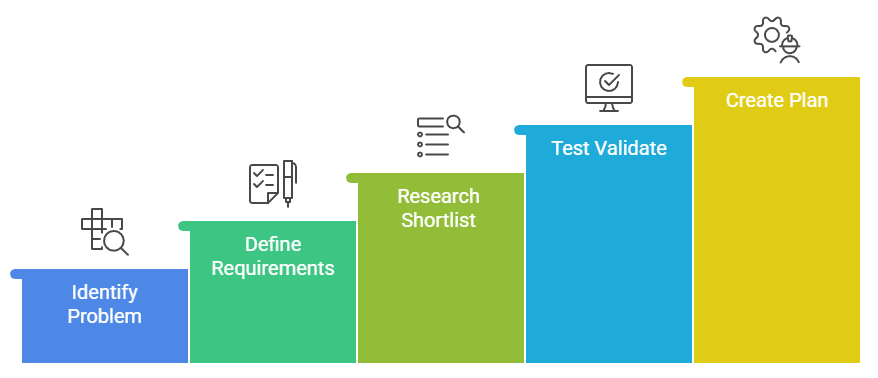
These five steps help you avoid tool chaos, broken workflows, and systems that slow your business down instead of helping it grow.
The technology selection process is straightforward when you follow this framework:
- Identify the business problem - Be specific about what you're solving
- Define your requirements - Focus on functionality, usability, integration
- Research and shortlist - Find the best fit, not the best tool
- Test and validate - See how it works in real conditions
- Create implementation plan - Ensure adoption with proper planning
When implemented correctly, technology removes friction, scales with your business, and enables growth.
Ready to Choose the Right Technology?
If you want help applying this framework to your business and choosing the right AI and automation setup, you can book a free consultation at Axe Automation.
Let's make technology work for your business, not against it.